
✍️ By Home & Style Essentials 📅 Updated June 2026 ⏱ 8 min read
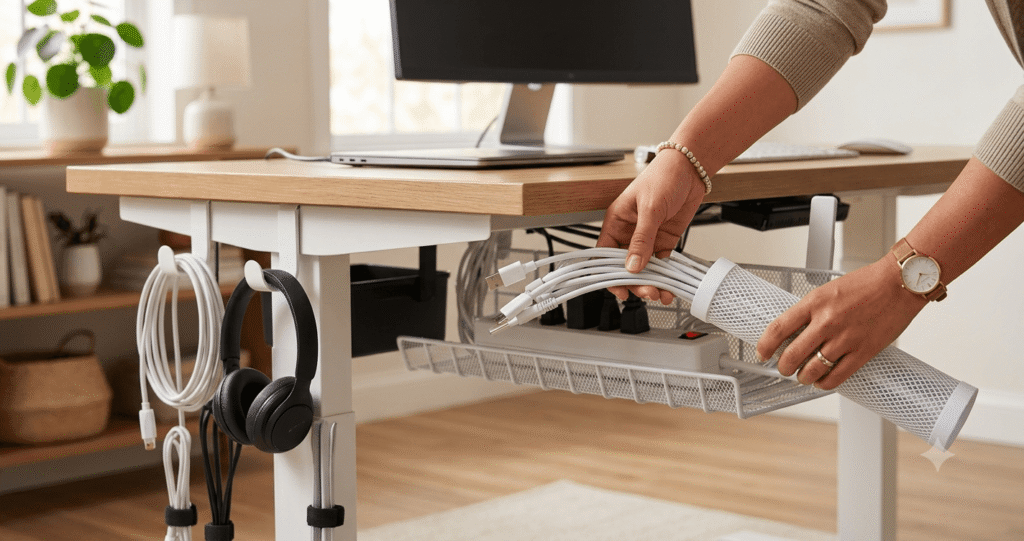
Look under your desk right now. Go on, we’ll wait.
If it looks like a family of snakes set up camp behind your monitor, you’re not alone, all you need is under-desk organizers and cable management kits.
Somewhere between the laptop charger, the monitor cable, the desk lamp cord, and whatever that mystery wire is (nobody knows anymore), most home offices turn into a tangled mess within a month of setup. This hassel can be avoided with under-desk organizers and cable management kits.
The good news? You don’t need a fancy standing desk with built-in trays to fix it. A handful of smart, cheap accessories inform of under-desk organizers and cable management kits can turn that rat’s nest into a clean, organized setup in under an hour. We rounded up the best under-desk organizers and cable management kits under $40 that actually solve the problem instead of just hiding it.
If you’re still finalizing the rest of your setup, check out our home office setup guide for the bigger picture, or browse our smart home starter guide if you’re adding smart plugs and hubs into the mix (which, fair warning, means more cables).
Why Cable Management Actually Matters?
This isn’t just about looks, though a tidy desk does wonders for your focus. Loose cables:
- Collect dust bunnies that are a pain to clean
- Create tripping hazards near your feet
- Make it harder to find the right cord when something breaks
- Put extra strain on charging ports and connectors, which can shorten their lifespan
- Just look bad on video calls when your camera catches the mess behind your monitor
A basic cable management setup including under-desk organizers and cable management kits fixes all of that, and the best part is you don’t need to spend much to do it right.
Quick Comparison Table
| Product | Best For | Price Range | Key Feature |
|---|---|---|---|
| Under Desk Cable Tray | Overall Best Value | $15-20 | No-drill clip mount, holds power strips |
| Under Desk Organizer | Heavy Cable Loads | $20-25 | Extra-long steel tray design |
| Yecaye Cord Organizer Kit | Budget Pick | $10-18 | 16-piece all-in-one bundle |
| D-Line CABLE Management Box | Hiding Power Strips | $18-22 | Fully enclosed, fireproof material |
| Alex Tech Cable Management Sleeve | Minimalist Setups | $12-16 | Flexible neoprene sleeve, cuts to length |
| Scanfield Cable Cord Organizer | Standing Desks | $25-30 | Adjustable length, moves with desk height |
| VIVO Desk Cable Tray | DIY Mounters | $30-38 | Sturdy metal frame, screw-mount option |
In-Depth Product Reviews
1. Under Desk Cable Management Tray, Best Overall
This one shows up in almost every “best cable organizer” list for good reason. It’s a simple mesh tray that clips onto the underside of your desk with adjustable clamps, no drilling or screws needed. Power strips, chargers, and cable clusters all sit inside the tray, completely out of sight.
Key Features:
| ⭐ No-drill clamp mounting system. | ⭐ Fits desks up to 1.6 inches thick. |
| ⭐ Mesh design allows airflow (keeps power strips from overheating). | ⭐ Available in multiple lengths. |
| ✔ Pros | ❌ Cons |
|---|---|
| ✔ Setup takes about 10 minutes. | ❌ Slightly visible from the front if your desk has no privacy panel. |
✔ Sturdy enough to hold a full power strip plus adapters. | ❌ Not ideal for glass desks (clamps need a solid edge). |
✔ Doesn’t damage desk surfaces. |
Ideal User: Anyone who wants a no-commitment, renter-friendly solution that just works.
Check current price on Amazon 👇

- 【No Drill Mounted】Cable management tray can be assembled in as little as 3 minutes or less-simply. Side clips easily cla…
- 【Rubber Pad Protects Desk】Wire organizer under desk built-in soft rubber pads on the clamp protect your desk from scratc…
- 【Sturdy and Beautiful】Cord management under desk is made of high-quality carbon steel and holds about 15 lbs. The wire b…
2. Under Desk Cable Organizer, Best for Heavy Cable Loads
If your desk supports two monitors, a dock, a webcam, and a desk lamp, you need something with real capacity. This tray is longer and deeper than most competitors, built from steel with a matte black finish that blends into most office setups.
Key Features:
| ⭐ 17-inch length steel tray. | ⭐ Weight capacity built for multiple power strips. |
| ⭐ Reinforced clamp brackets. |
| ✔ Pros | ❌ Cons |
|---|---|
| ✔ Handles bulky power adapters without sagging. | ❌ Bulkier profile means it needs more desk clearance underneath. |
✔ Solid, professional-looking finish. | ❌ A bit pricier than basic mesh trays. |
✔ Easy tool-free installation. |
Ideal User: Multi-monitor setups or anyone running a lot of peripherals off one desk.
Check current price on Amazon 👇
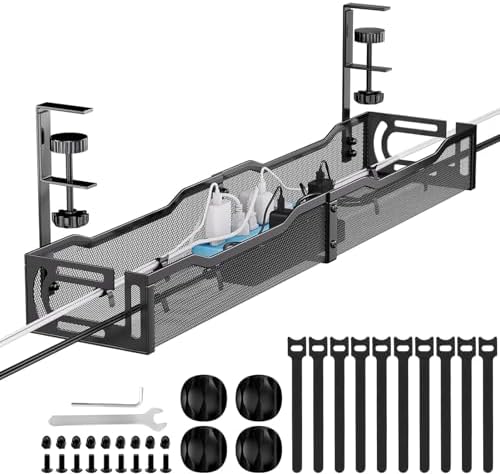
- 【25” Large Size】The 25” cable management under desk provides enough space for all your cables. Desk cable management c…
- 【Under Desk Cable Management Tray】Our workspace organizers are suitable for the desk within 0.4″ to 2″ thick. The cord o…
- 【Sturdy Structure】The cable management tray is made of sturdy metal. The mesh structure can maintain good ventilation to…
3. Yecaye Cord Organizer Kit, Best Budget Pick
This is less a single product and more a starter toolkit. You get adhesive cable clips, a cord sleeve, twist ties, and a small cable box, everything you need to go from chaos to clean without buying five separate items.
Key Features:
| ⭐ 16-piece bundle (clips, sleeve, ties, box). | ⭐ Compatible with most cable thicknesses. |
⭐ Adhesive-backed clips for desk edges and walls. |
| ✔ Pros | ❌ Cons |
|---|---|
| ✔ Extremely affordable for what you get. | ❌ Adhesive clips can lose grip over time on rough surfaces. |
✔ Flexible enough to use across desk, TV stand, and nightstand. | ❌ Not a single unified system, more of a mix-and-match toolkit. |
✔ Great starter kit if you’re organizing multiple rooms. |
Ideal User: Budget-conscious buyers who want to tackle cable clutter in more than one spot in the house.
Check current price on Amazon 👇

- Spacious Practical Cable Management Solution — This J channel desk cable organizer set includes 6 J channels cable manag…
- User-Friendly Design Advantage – Unlike traditional cord organizer for desk, our J channel cord management feature a uni…
- Quick Installation, Damage-Free Removal – Each wire organizers for cords comes with pre-applied adhesive tape, allowing …
4. D-Line CABLE Management Box, Best for Hiding Power Strips
Power strips with six plugs and blinking lights are not exactly a design statement. This box swallows the whole thing, cables and all, leaving just a small opening for the cords that need to reach your devices.
Key Features:
| ⭐ Fully enclosed design. | ⭐ Ventilation slots to prevent heat buildup. |
| ⭐ Fireproof, non-conductive ABS material. |
| ✔ Pros | ❌ Cons |
|---|---|
| ✔ Completely hides ugly power strips and surge protectors. | ❌ Takes up floor or desk space rather than mounting underneath. |
| ✔ Doubles as a stable surface (things won’t roll off a flat-top box). | ❌ Smaller sizes may not fit larger surge protectors. |
✔ Comes in several sizes. |
Ideal User: Anyone whose real problem is an ugly power strip, not just loose cords.
Check current price on Amazon 👇

- FOR USE WITH POWER STRIPS UP TO 10.5in Length: use D-Line Cable Management Boxes to contain power strips and cable clutt…
- PROTECT CABLES: D-Line Cord Organizer Boxes are Made in the UK from high quality electrically safe ABS plastic, so you c…
- STYLISH DESIGN: Curved edges & pin holes blend with surroundings. 3x rear cable entry/exit slots allow for a neat appear…
5. Alex Tech Cable Management Sleeve, Best for Minimalist Setups
Instead of a tray or box, this bundles multiple cords into one flexible neoprene sleeve that you can cut to length. The result is one thick, tidy cable instead of five thin ones running loose.
Key Features:
| ⭐ Neoprene sleeve, cuttable to custom length. | ⭐ Flexible enough to bend around desk legs and corners. |
| ⭐ Zipper-style opening to add or remove cables anytime. |
| ✔ Pros | ❌ Cons |
|---|---|
| ✔ Great for people who want cables bundled, not boxed away. | ❌ Doesn’t solve power strip clutter on its own. |
| ✔ Cheap and easy to trim to the exact length needed. | ❌ Zipper can be tricky to align with very thick cable bundles. |
| ✔ Works well combined with a tray for a fully clean look. |
Ideal User: Minimalists who want visible cables to at least look intentional and tidy.
Check current price on Amazon 👇

- Size: Diameter: 1/2″| Length: 25 Feet | Color: Black. Our wire loom is split and easy to load wires. Once loaded, our ca…
- Operating temp (degree F.):-103 to 257|Melt temp: 446. Our cable management sleeve is used for Hifi speaker hdmi automot…
- Our cord protector keeps cat from chewing cables. Our cable protector is insulated
6. Scanfield Cable Cord Organizer, Best for Standing Desks
Standing desks move, which means most cable trays either yank cords tight or leave a bunch of slack pooling on the floor. This organizer has an adjustable accordion-style design that expands and contracts as your desk height changes.
Key Features:
| ⭐ Expandable accordion structure. | ⭐ Clip-mount installation. |
| ⭐ Adjustable length to match desk height range. |
| ✔ Pros | ❌ Cons |
|---|---|
| ✔ Actually built with sit-stand desks in mind. | ❌ Slightly more involved to install than a fixed tray. |
| ✔ Keeps cords tensioned at any height. | ❌ Higher price point than basic organizers. |
| ✔ No re-adjusting needed after the initial setup. |
Ideal User: Standing desk owners tired of cords stretching or bunching up every time they adjust height.
Check current price on Amazon 👇

- We used ChatGPT to analyze our reviews and determine the main benefits our customers received. Here is the summary:
- IMPROVED DESK AESTHETICS: Users reported that the cable management trays helped make their desk setup look clean and org…
- EASY INSTALLATION: The trays come with strong adhesive backing, making them easy to install without the need for drillin…
7. VIVO Desk Cable Tray, Best for DIY Mounters
If you don’t mind grabbing a screwdriver for a more permanent setup, VIVO’s tray offers a sturdier mount than clip-based competitors. It’s built from heavier gauge metal and designed to stay put indefinitely.
Key Features:
| ⭐ Screw-mount or clamp-mount options. | ⭐ Multiple color finishes to match desk hardware. |
| ⭐ Heavy-gauge steel construction. |
| ✔ Pros | ❌ Cons |
|---|---|
| ✔ More permanent and stable than clip-only trays. | ❌ Screw mounting isn’t ideal for rented spaces or desks you may move. |
| ✔ Higher weight capacity. | ❌ Installation takes longer than clip-based options. |
| ✔ Good match for home offices with a fixed desk setup. |
Ideal User: Homeowners with a permanent desk setup who want the sturdiest possible mount.
Check current price on Amazon 👇
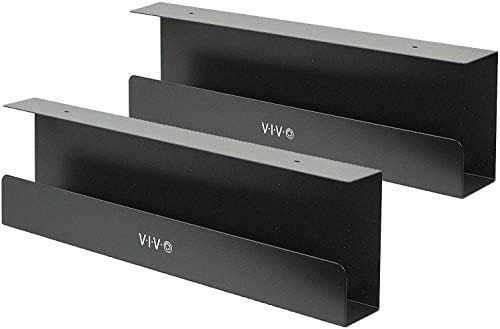
- Low Profile 33″ Cable Rack: If you’re tired of messy cords under your desk, look no further! This set of two 16.5″ x 3″ …
- Under Desk Mounting: Installs under wood or particle board desktops with the provided screws (mounting holes are 11″ apa…
- Modern Appearance: The cable holders’ black color and minimalist design makes them blend well with standard and modern d…
Buying Guide: What to Look for Before You Buy?
Not every cable organizer fits every desk. Here’s what actually matters before you add one to your cart.
Desk thickness and edge type. Clip-mount trays usually fit desks between 0.4 and 1.6 inches thick. Glass desks or unusually thin edges may need a screw-mount or adhesive option instead.
How many devices you’re powering. A single laptop charger and mouse dongle barely need more than a sleeve. A dual-monitor, dock, and desk lamp setup needs a full tray with real capacity.
Standing vs. fixed desk. If your desk moves, look for organizers built to expand and contract. A fixed tray on a standing desk will either go slack or pull tight depending on your height setting.
Renting or planning to move soon. Clip-mount and adhesive options leave no marks. Screw-mount trays are sturdier but more permanent.
Airflow for your power strip. If you’re boxing in a power strip, make sure the container has ventilation. Enclosed spaces with no airflow can trap heat around chargers and adapters.
Frequently Asked Questions
What is the best cheap way to organize cables under a desk? A basic clip-mount cable tray combined with adhesive cable clips is usually the cheapest effective combo, often under $25 total, and covers both the power strip and the individual cords running to your devices.
Do under-desk cable trays damage the desk? Clip-mount and clamp-style trays typically don’t damage desks since they rely on pressure, not screws or adhesive. Screw-mount trays will leave small holes, so they’re better for desks you plan to keep long-term.
Can I use a cable tray on a glass desk? Most clamp-style trays need a solid edge to grip properly, so they’re not ideal for glass desks. Adhesive-based organizers or a standalone cable box tend to work better in that case.
How do I manage cables on a standing desk? Look for an accordion-style or expandable cable organizer designed to stretch and compress as the desk height changes, rather than a fixed-length tray that can pull tight or sag.
Is it safe to enclose a power strip in a cable box? Yes, as long as the box has ventilation slots and is made from fireproof, non-conductive material. Avoid sealing a power strip in an airtight container with no airflow.
Final Verdict
If you want the simplest fix with the least effort, the JOTO Under Desk Cable Management Tray is the easiest recommendation. It installs in minutes, hides your power strip, and works on nearly any desk without tools.
If your setup is bigger (multiple monitors, a dock, extra peripherals) go with the Cable Matters Under Desk Cable Organizer for the extra capacity. And if you’re working with a standing desk, skip the fixed trays entirely and get the Bates Choice Cord Organizer so your cables move with you instead of fighting you.
Whichever option you pick, the fix takes less than an hour and costs less than a nice dinner out. Your future self (and your next video call background) will thank you.
Looking to round out the rest of your setup? Check out our guides on smart home essentials and home office must-haves for more budget-friendly upgrades.
Disclosure: This post contains affiliate links. If you purchase through our links, we may earn a small commission at no additional cost to you. We only recommend products we genuinely believe in.




[…] This is an easy one to overlook, especially if you’re also working on tidying up your home office and desk setup. A small carry bag or drawer organizer keeps bands from tangling with cables and […]
[…] your lifestyle. If you’re also building out your everyday essentials, check out our guide to under-desk organizers for more small-space, big-impact […]
[…] small updates like these with the best under-desk organizers and cable kits is a solid way to tidy your whole home office, not just your living […]